
Minimal Link Analytics That Actually Helps Decisions
Most teams do not have an analytics problem. They have a decision problem.
They collect more metrics than they can act on, open dashboards too late, and still struggle to answer basic questions like which links deserve more distribution, which campaigns are wasting attention, and which assets should be retired. Minimal link analytics solves that by reducing measurement to the signals that change behavior.
Quick answer
If your team wants link analytics that actually improves execution, start with a small metric set tied to specific actions.
For most teams, the minimum useful set is:
- clicks
- last accessed timestamp
- link status
- campaign or channel label
- destination URL
- optional source or referrer breakdown if available
That is enough to answer the questions that matter most:
- Which links are earning attention?
- Which links are stale or forgotten?
- Which campaigns should get more distribution?
- Which links need to be updated, paused, redirected, or archived?
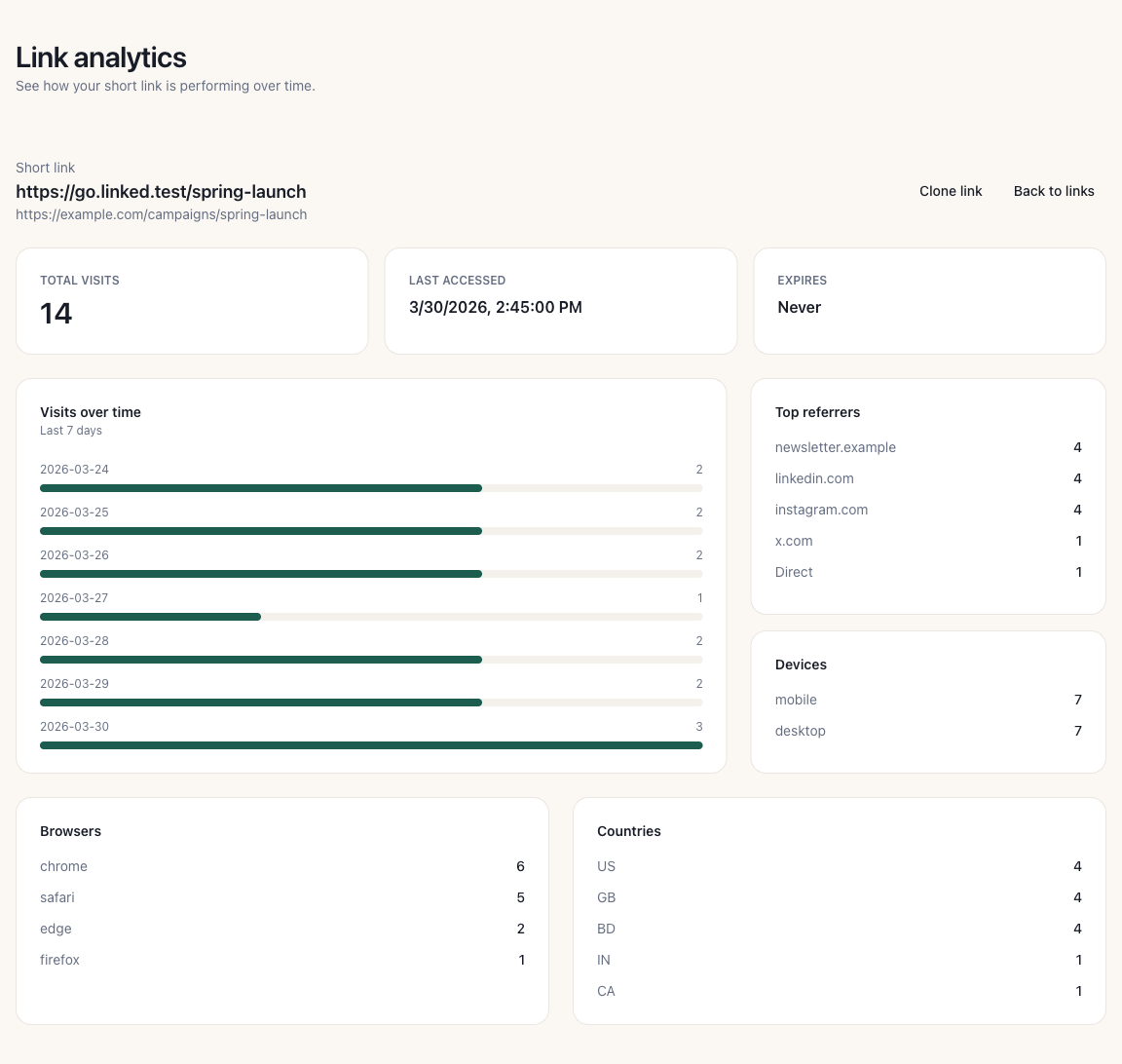
Example: a focused link analytics view with the few metrics needed for weekly decisions.
Why this matters financially
Analytics overhead has a real cost.
Teams lose time when they:
- review dashboards that do not lead to action
- keep dead or outdated links live in campaigns
- miss signs that high-interest links should be redistributed faster
- spend reporting time on vanity metrics instead of operational fixes
The goal of link analytics is not to create a reporting system. The goal is to improve link-level decisions while traffic is still useful.
Why minimal analytics outperforms dashboard overload
A smaller analytics system usually works better because it compresses the path from observation to action.
When a team sees 30 metrics, nobody knows which one should trigger a change. When a team sees 5 decision-ready metrics, ownership is clearer.
Minimal analytics works because it does three things well:
1. It highlights distribution winners early
If one link gets disproportionate clicks relative to similar campaign assets, that is usually a signal to redistribute it through more channels, reuse the hook, or promote the asset harder.
2. It exposes underperforming assets quickly
A link with low clicks, old last-access dates, or a mismatched campaign label is easier to identify and either improve or retire.
3. It keeps review cycles operational
The more metrics a team tracks, the more review becomes passive observation. A smaller set keeps analytics tied to concrete actions like updating copy, changing placement, fixing routing, or ending low-value distribution.
The minimal metric set
For most marketing, content, and growth teams, six fields are enough.
1. Total clicks
This is the simplest attention signal.
Use it to answer:
- which links attract the most interest
- which campaigns are actually getting traffic
- which assets deserve a second round of distribution
Clicks are not the full story, but they are the fastest signal that attention exists.
2. Last accessed timestamp
This shows whether a link is still active in the real world.
Use it to answer:
- which older links still receive traffic
- which campaign assets remain relevant after launch
- which links can be safely archived or redirected
This metric is especially useful for identifying stale assets that still get traffic from old emails, social posts, QR codes, or documentation.
3. Link status
A link should not just exist. It should be intentionally active, expired, protected, or retired.
Use status to answer:
- which links are still live by design
- which links should be disabled
- which temporary links were never cleaned up
Without status tracking, teams often confuse "still clickable" with "still valid."
4. Campaign or channel label
This creates context around performance.
Use it to answer:
- which campaigns are producing the most link activity
- which channels deserve more attention
- which links are missing proper categorization
A click count without context is just a number. A click count attached to a campaign or channel becomes a decision signal.
5. Destination URL
This is a governance metric as much as an analytics field.
Use it to answer:
- whether high-traffic links still point to the right destination
- whether old campaigns are sending traffic to outdated pages
- whether multiple short links are pointing at duplicate or competing destinations
6. Source or referrer breakdown if available
This is useful when your workflow needs channel-level optimization.
Use it to answer:
- where demand is coming from
- which channels amplify high-performing links
- whether a link is succeeding in the channels you intended
This field is helpful, but it is not mandatory for a minimal setup if it slows the team down.
What decisions these metrics should drive
The test for every metric is simple: what action should this metric trigger?
Use this framework:
| Metric pattern | Likely meaning | Action |
|---|---|---|
| High clicks, recent access | strong current interest | redistribute, extend campaign, test adjacent placements |
| Low clicks, recent launch | weak initial traction | revise CTA, placement, or audience targeting |
| High clicks, outdated destination | traffic is still active but destination may be wrong | update or redirect immediately |
| Old last access, active status | link is live but no longer useful | archive, expire, or remove from active inventory |
| Missing campaign label | tracking lacks decision context | classify link before next review |
| Traffic from unexpected source | distribution pattern changed | investigate and adapt campaign routing |
If your analytics system does not produce actions like these, it is reporting, not decision support.
Impact model
Use a simple model to estimate analytics value:
Decision value = traffic x actionability x speed of response
Example:
- 2,500 clicks on a campaign link
- one clear action available, such as redirecting more traffic to the winning asset
- action taken within the same review cycle instead of two weeks later
The value of analytics does not come from the dashboard itself. It comes from how quickly the team converts observed traffic into better distribution, cleaner routing, or faster cleanup.
Weekly review cadence
Minimal analytics works best when tied to a short operating rhythm.
A practical weekly review looks like this:
1. Review top-performing links
Look for links with the highest click activity and recent access.
Ask:
- should these links be redistributed through more channels?
- should the same offer, headline, or CTA be reused elsewhere?
- are these links pointing to the best possible destination page?
2. Review stale but active links
Find links that are still active but show old or no recent access.
Ask:
- should they remain live?
- should they redirect to a newer asset?
- are they still visible in old campaigns or documents?
3. Review tracking hygiene
Check for links missing campaign labels, inconsistent naming, or unclear ownership.
Ask:
- can someone explain what this link is for in under 10 seconds?
- does the naming make filtering easy?
- is there a clear owner for the link?
4. Commit one action per review
Every review should end with at least one concrete action:
- redistribute a winner
- fix an outdated destination
- pause an old link
- improve campaign labeling
- expire a temporary asset
Without that final step, analytics becomes passive observation again.
Minimal analytics workflow in Linked.bd
Linked.bd is well suited to this operating model because the workflow does not depend on building a full BI stack first.
A team can use Linked.bd to:
- create branded short links with campaign context
- review click activity at the link level
- identify when a link was last accessed
- manage active, protected, or expiring links intentionally
- clean up outdated links before they create confusion
That makes the product useful not just for shortening URLs, but for maintaining a decision-ready link inventory.
Why teams choose minimal link analytics over full dashboard sprawl
A larger analytics stack is not automatically better.
In many teams, dashboard sprawl creates these problems:
- too many metrics without ownership
- slow review cycles
- reports optimized for presentation instead of action
- weak link governance despite heavy measurement
A minimal link analytics model is better when the goal is operational clarity.
It helps teams answer the core questions faster:
- what is working now
- what should change next
- what should be cleaned up
Capability snapshot
- Link-level click visibility
- Last accessed tracking
- Link status awareness
- Campaign-friendly organization
- Destination-level governance
- Expiration support
- Password-protected link controls
- Branded short-link workflows
Governance layer
Minimal analytics only works if the underlying link inventory is managed well.
Use these rules:
- every link should have a clear owner
- every campaign link should have a consistent label or grouping
- temporary links should have expiration logic where appropriate
- old links should be reviewed before they become routing debt
- destination changes should be intentional and documented
Analytics quality depends on system quality. If your link inventory is messy, your decisions will be messy too.
Common failure modes
Tracking too many metrics
Teams collect more than they use and lose the ability to act quickly.
No naming or labeling standard
Clicks exist, but nobody can reliably connect them to campaigns or owners.
No review rhythm
Useful data accumulates, but no one turns it into action.
Measuring links without governance
Teams track clicks while ignoring expiration, stale destinations, and outdated assets.
Treating analytics as reporting only
The dashboard is reviewed, but nothing changes after the review.
What to measure if you want to stay minimal
For most teams, start here:
- clicks
- last accessed timestamp
- status
- campaign label
- destination URL
Only add more metrics when they unlock a real decision the team is ready to make.
Final takeaway
Minimal link analytics is not about measuring less for the sake of simplicity. It is about measuring the few things that improve action speed.
If your team can identify winners, retire stale links, fix routing mistakes, and keep campaign context clean, the analytics system is doing its job.
That is usually more valuable than a larger dashboard with no operational consequence.
FAQ
What are the most useful link analytics metrics?
For most teams: clicks, last accessed timestamp, link status, campaign label, destination URL, and optionally source or referrer.
Do small teams need a full attribution dashboard?
Usually not for day-to-day link decisions. A smaller set of operational metrics is often enough to improve campaign execution.
How often should link analytics be reviewed?
Weekly is a practical default. Fast-moving campaigns may justify more frequent checks.
What makes a link metric useful?
A metric is useful if it triggers a clear action such as redistributing a high-performing link, updating a destination, or retiring a stale asset.
Why is last accessed such an important metric?
It helps teams see whether a link still matters in the real world, even after the original campaign has ended.
When should a team add more metrics?
Only when the extra metric supports a real decision the team is prepared to make consistently.
Sources
- Google Analytics campaign attribution overview: https://support.google.com/analytics/answer/11242870
- Google Analytics traffic acquisition reporting: https://support.google.com/analytics/answer/11986666
- Google URL builder guidance for campaign measurement: https://support.google.com/analytics/answer/10917952